Template
Curriculum vitae templates
A free CV template with a clean, plain layout that is easy for employers to read.
Download the template
Download everything
Blank and worked example, in Word and PDF, in one ZIP file (426 KB).
How to use it
- Open the Word file and replace the example headings with your own details. Name, phone, email and town are enough at the top.
- Write two or three lines in the personal profile about who you are, what you are good at and the kind of role you want.
- List your jobs with the newest first. For each one, add the dates, job title, employer and two or three things you achieved, with numbers where you can.
- Add your education, courses and certificates that matter for the job you are applying for.
- Tailor the CV for each application, keep it to two pages at most, check the spelling and save it as a PDF before you send it.
About this template
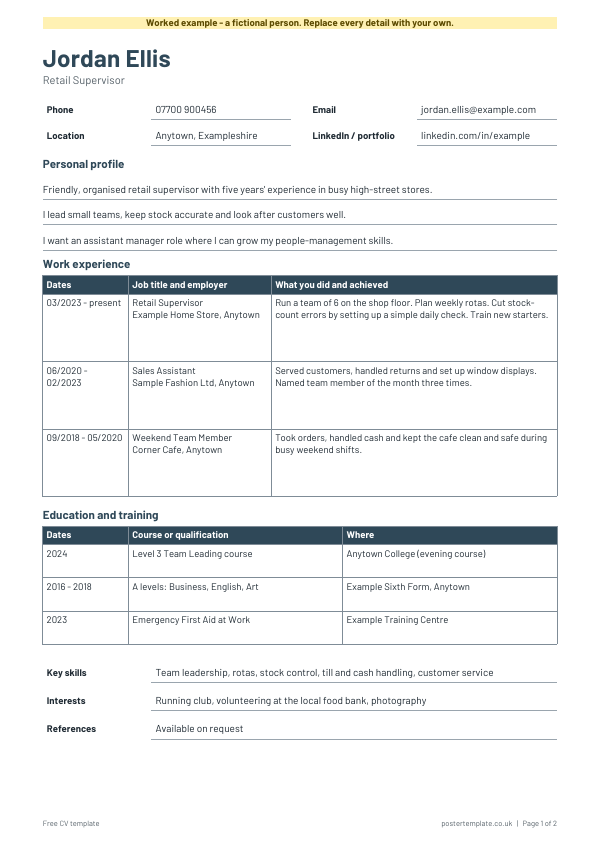
It has space for your contact details, a short personal profile, your work history with the newest job first, your education and training, and your key skills, interests and references. It comes as an editable Word file and as a print-ready PDF, and there is a filled-in example for a fictional person so you can see the level of detail that works. The layout uses simple tables and standard fonts, so it opens the same way on most computers. The worked example has a how-to page at the end to guide you; the blank holds only your CV.
Questions
How long should a CV be?
Two pages is a common length in the UK. If you are early in your career, one page can be plenty. Keep the most relevant information near the top.
Do I need a photo or my date of birth on my CV?
Most UK employers do not ask for either, so you can leave them out. Include them only if the job advert asks for them.
Should I send a Word file or a PDF?
A PDF keeps the layout exactly as you made it, so it is the safer choice unless the employer asks for Word. Edit in Word first, then use Save as PDF.
What should I put in the references section?
Many people write "References available on request", or list two people who have agreed to speak for you. Ask each person first.
Can I change the layout?
Yes. In Word you can add or remove rows, rename headings and change the order of the sections to suit your experience.
Related templates
 Letter of introduction templates
 Personal reference letter template
 Job description templates
 Employment application form templates
Free, no sign-up. Edit the Word file or print the PDF. All templates